

DrayTek Vigor 130 VDSL2/ADSL2+ (FTTC/BT Infinity) Gigabit Ethernet Modem
Details
- BrandDrayTek
- Internet service providerDSL providers
- Connectivity technologyEthernet
- Compatible devicesPersonal
- Number of ports3
Description
🚀 Elevate Your Internet Experience!
- SEAMLESS CONNECTIVITY - Experience lightning-fast internet with 3 Gbps data transfer rates.
- BT APPROVED PERFORMANCE - Certified under BT SIN 498 MCT for reliable and efficient performance.
- FUTURE PROOF TECHNOLOGY - Stay ahead with full IPv4 and IPv6 support for all your networking needs.
- MULTIPLE DEVICE SUPPORT - Connect up to 3 devices simultaneously for a streamlined experience.
- VERSATILE COMPATIBILITY - Works flawlessly with DrayTek dual-WAN products and other Ethernet WAN firewalls.
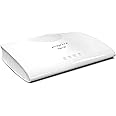
The DrayTek Vigor 130 is a high-performance VDSL2/ADSL2+ Ethernet modem designed for seamless connectivity and compatibility with various devices. With a data transfer rate of up to 3 Gbps and support for both IPv4 and IPv6, this modem is perfect for modern networking needs. Its 3 Ethernet ports allow for multiple device connections, making it an ideal choice for both home and office environments.



Specifications
| Brand | DrayTek |
| Product Dimensions | 9.5 x 32 x 18 cm; 798.32 g |
| Item model number | v130-B |
| Manufacturer | Draytek |
| Wireless Type | Bluetooth |
| Number of Ethernet Ports | 3 |
| Voltage | 12 Volts |
| Wattage | 13.2 watts |
| Power Source | Plug Type G (UK) |
| Are Batteries Included | No |
| Item Weight | 798 g |
| Guaranteed software updates until | unknown |
Reviews
S**Y
Wow, wow, wow. THE simple solution to all those WiFi 6 Routers with no integrated modem
This is a brilliant piece of kit. Simple instructions and dead easy to set up. If you are with a mainstream ISP in the UK, it is plug and play, no configuration to use this as a simple modem. Connect and power it up first, then connect to your router, it passes the internet signal via an Ethernet cable straight into your router WAN port for the router to use and distribute with no messing about required. An absolute breeze and does what it says on the tin. I haven’t explored it, but it also has a more advanced configuration user interface if you wish to access it via your PC, that’s one for the real techies. For me, I just wanted a solid reliable and separate modem to work with my new WiFi 6 router. This is THE solid simple solution to all those WiFi 6 Routers with no integrated DSL modem - all the new WiFi 6 routers I’ve seen are routers only, with no integrated modem. Been up and running now 24 hours, no drop outs just a great internet connection.UPDATE: July 2020: been running flawlessly now for nearly 2 months. Great plug and play modem if you are with a mainstream UK ISP.
D**N
Great modem for DSL
Firstly, this is a modem only and not a router.If you buy this on its own, you can only connect one computer to it. There is no router, no wifi and no access controls.Until recently I was forced to use the ISP supplied modem/router what was built to a low price and it showed. Drops, lockups and poor range. I'd been using a decent router in AP-only mode for ages but wasn't allowed to get the PPPoE settings. This suddenly changed and when it did, I ordered this. From a user perspective, it is fast, stable and has some useful options. Since moving over, I've seen a 50% reduction in ping returns, a 5% increase of download speed but no increase in upload. So far no lockups, Draytek supply firmware updates to keep the bugs in check.Well worth the money
O**H
This is JUST a modem and that is EXACTLY what I wanted!
I bought the DrayTek Vigor as I needed a modem to replace the "toy" router that my ISP sent me. Already owning a perfectly good router, I did not need another and using the "toy" in bridge mode was not good enough.Originally I was going to buy a BT OpenReach VDSL modem via eBay. However, BT have officially stopped supplying them and by the end of the year are going to stop supporting them when they fail. Therefore, I needed to find an alternative bridge-only modem that was BT approved and VDSL compatible. This was a harder task than I thought, until I found the DrayTek Vigor 130.This little guy works in exactly the same way as the BT OpenReach VDSL modem and as an added bonus, only has one LAN port that both gives you your modem bridge AND can be used to access the modem GUI to retrieve line stats etc. If you are buying this you already need a router, and thanks to this handy setup you can use the same port for pppoe to the internet and as a LAN connection into the modem to get line stats.Diving in deeper, there was a small issue after I connected the LAN GUI to my router - the modem does not have a way to set it's local networking into DHCP mode (that I have found anyway) which means you either have to statically configure the IP in your IP range, or as I did, leave it set how it is and then add a route to the modem back to your router. To this end, the DrayTek modem has a well documented CLI.Overall, I am extremely happy with this modem, so happy that I now own two of them and to anyone who needs a modem only, or would like to replace the EOL BT OpenReach VDSL modem I could not think of a better replacement.
J**O
Works well out of the box but somewhat confusing GUI
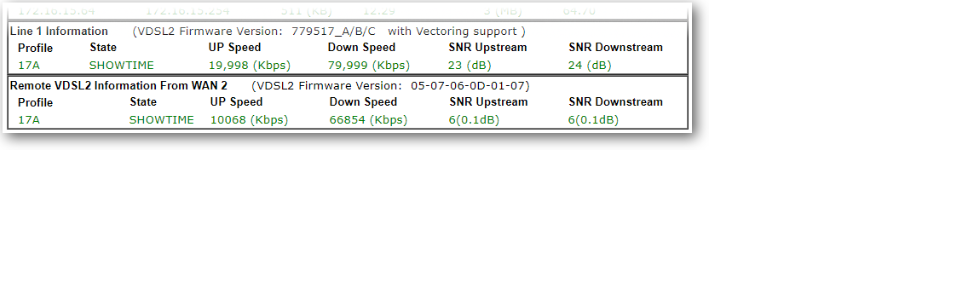
When my FTTC broadband started dropping it's connection, my router reported "modem hangup" so naturally I thought it might just be an issue with the BT Openreach fibre modem supplied almost 10 years ago and so ordered the Draytek Vigor 130 which was delivered the next day - I wasn't too happy with the item not being packaged in anything other than it's retail box, if I hadn't been at home and the box was left outside it would've gotten very wet.The Vigor 130 is indeed plug and play, I replaced the BTOR modem with the Vigor 130 and after a few minutes I was able to browse it's web page at 192.168.2.1 and see all the fibre connection status info which showed that line was playing up. Thanks to the detailed info from both the UI and via a Telnet session, I had a good idea what was going on with the line and was able to provide detailed info to Plusnet technical support once I'd raised a fault call.The web GUI is confusing though, with the dashboard/home page showing IPv4 internet access WAN1 as being disconnected, which quite reasonably leads you to think that the broadband connection is down, but in the Interface section below that, it shows that DSL is connected as is the LAN (to the router) so all is good.Regarding the reviews stating that the Vigor's DHCP server needs to be switched off in it's LAN settings, that should only be necessary if your router's IP address is in the 192.168.2.x subnet, which isn't usually the case as almost every router I've had uses 192.168.1.1 as it's address so any connected clients aren't going to be touching the Vigor's DHCP server unless explicitly connecting to it via it's IP address. However, if you plug a laptop into the Vigor, it's DHCP server will dish out an IP address for said laptop, so that's why it's there and why it's enabled. NOTE that if you do connect a computer directly to the Vigor whilst it's connected to the internet, make sure your computer's firewall is up and running or better still, invest in a good internet security software suite, otherwise your computer might get infected with all sorts of nasties in no time.It's worth noting that with the latest firmware version 3.8.4.1_BT it's not possible to set the date and time on the Vigor and it doesn't get it from a time server, so the date will be January 1st 2000 when first switched on.In hindsight I probably don't need the Vigor 130 as I suspect the BT Openreach modem is fine, but as it's locked there's no way to query any line stats or operating status, so for that reason the Vigor is worth having (assuming you can justify the expense) and I've also found that my download speeds have increased from around 69Mbps pre-Vigor to 73Mbps with the Vigor connected.If you regularly have problems with your ADSL or VDSL broadband (the Vigor 130 handles both) and are a bit of a techie, I'd recommend investing in a Vigor 130 as it'll enable you to monitor what's going on and who knows, the info it provides might make a difference to getting the problem fixed more quickly.
Common Questions
Trustpilot
2 weeks ago
2 days ago


Desert Online General Trading LLC
Dubai, United Arab Emirates